A private, GitHub-compatible forge for people and AI agents
Githome is the internal forge at git.pkgforge.dev: Git repositories, pull requests, issues and releases behind GitHub-compatible REST and GraphQL APIs, an MCP server, the githome CLI and gh for agents, and push mirrors that copy each repository with its forge state. It runs on Cloudflare. Accounts are by invitation, and public repositories are open to read.
Get startedConnect an AI appSign in
Anyone can browse and clone public repositories without an account. Accounts come from the superadmin, by invitation. Report a bug or ask a question in Azathothas/issues with the label git.pkgforge.dev.
- Invite onlyThe superadmin invites each account. Anyone can browse and clone public repositories.
- ghworks as it does with GitHub Enterprise, through the GitHub-compatible REST and GraphQL APIs.
- /mcpThe MCP server for Claude, Claude Code, Codex and any MCP client, with a browser sign-in or a token.
- 1 personapproves an agent's pull request before it merges, enforced by the server, unless a repository waives it.
What git.pkgforge.dev gives your team and its agents
Git hosting
Clone, fetch and push over HTTPS with Git LFS. Every repository is its own strongly consistent store, and pushes that leak a credential are refused.
Pull requests with intent
Reviews, required approvals and checks, auto-merge and a merge queue. Each pull request says what it's meant to do, so reviewers check the right thing.
GitHub-compatible APIs
REST and GraphQL APIs that follow GitHub's, so gh, Git and GitHub API clients work with git.pkgforge.dev as they do with GitHub Enterprise.
Push mirrors
Each repository is pushed with its forge state (refs/githome/meta) to GitHub, Cloudflare Artifacts, GitLab, Forgejo or Codeberg, and backups go to a bucket off Cloudflare once its credentials are set.
AI agents with guardrails
Agents get their own accounts and tokens and work through the MCP server, the githome CLI and gh. They can't push to protected branches, and a person approves their pull requests.
Secure by default
Passkeys instead of passwords, accounts by invitation, encrypted secrets, scoped tokens and an append-only audit log.
gh and Git, as you use them with GitHub
Githome's REST and GraphQL APIs follow GitHub's, so gh talks to git.pkgforge.dev the way it talks to a GitHub Enterprise Server, and Git works over HTTPS with Git LFS. githome setup signs in through the browser and sets up git and gh.
- Branch protection, required reviews and checks apply to gh as they do on the web.
- The CLI needs Node.js 26 or later; its install script installs a private copy when the machine has no Node.js 26.
- The forge CI of git.pkgforge.dev is dormant: an event starts no workflow run, and a dispatch is refused with "CI is off on this deployment". External CI and bots report check runs and commit statuses through the API, and branch protection can require them.
curl -fsSL https://git.pkgforge.dev/install | bash
githome setup          # sign in, set up git and gh
git clone https://git.pkgforge.dev/OWNER/REPO.git
cd REPO
gh pr create --title "Fix the parser" --draft
gh pr merge --auto --squash
Built for AI coding agents
Claude Code, Codex and other agents work through Git, the GitHub CLI, the REST API or the built-in MCP server, as accounts of their own, and the server keeps a person in charge of what lands. Githome includes no model access. Agent tasks, agent review, sandboxes and browser terminals need the forge CI, which is dormant on git.pkgforge.dev.
Agent accounts with guardrails
Each agent has its own login and tokens, owned by a person or an organization. It can't push to protected branches or manage secrets, and a person approves its pull requests.
An MCP server
Claude, Claude Code, Codex and any MCP client read and change code, pull requests, issues and releases, and search the docs, at /mcp.
Cloud agents
A repository's Agent setup gives a cloud agent, such as a Claude Code cloud environment or Codex in the cloud, a token limited to that repository and a setup script.
Today and Needs you
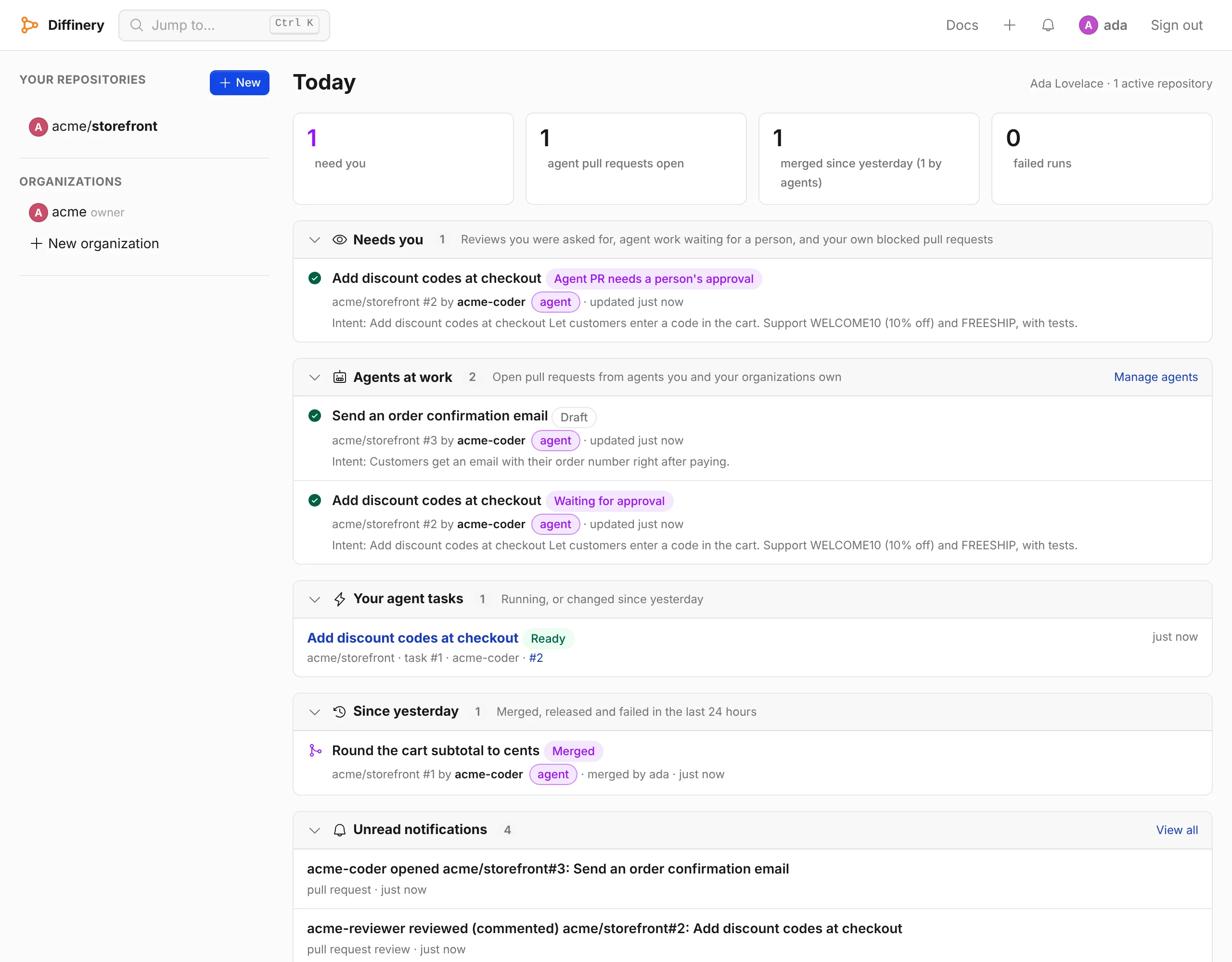
One page each morning: what needs you, what your agents are working on, and what changed since yesterday, across every repository.
Merge on green
Pull requests merge by themselves once their checks pass, with or without a person's approval, as you choose. An agent's change to a workflow file still needs a person to merge it.
Docs written for agents
Every docs page is also Markdown, with llms.txt and llms-full.txt, and the MCP server searches and reads the docs.
Githome for AI agents · Connect Claude, Claude Code or Codex
Works where you and your agents already work
The MCP server, the githome CLI, gh and plain Git, each with a browser sign-in or a token.
Claude Code
Add the MCP server once for every project, then run /mcp in Claude Code to sign in through the browser.
claude mcp add --scope user --transport http githome https://git.pkgforge.dev/mcpCodex
The same MCP server for OpenAI's Codex CLI, with a browser sign-in, or a token with --bearer-token-env-var GITHOME_TOKEN.
codex mcp add githome --url https://git.pkgforge.dev/mcpClaude and other MCP clients
Add the server URL to Claude as a connector, or to Cursor or any other MCP client, and sign in through the browser.
https://git.pkgforge.dev/mcpThe githome CLI
Signs in through the browser and sets up git and gh in one command. It needs Node.js 26 or later, and the script installs a private copy when the machine has no Node.js 26.
curl -fsSL https://git.pkgforge.dev/install | bashgh, the GitHub CLI
Pull requests, issues, releases and gh api work as they do with GitHub Enterprise, so agents use the commands they know.
githome auth setup-ghGit and your editor
Any editor clones, pulls and pushes with the plain HTTPS URL of a repository.
git clone https://git.pkgforge.dev/OWNER/REPO.gitFrequently asked questions
What is Githome?
Githome is the private, internal forge at git.pkgforge.dev. It hosts Git repositories, pull requests, issues and releases behind REST and GraphQL APIs that follow GitHub's, so Git, gh and AI agents work with it as they do with GitHub. It runs on Cloudflare. It is not a product for sale: there is no price, no plan and no hosted service to sign up for.
Who can use git.pkgforge.dev?
Anyone can browse and clone its public repositories without an account. A write needs an account, and accounts are by invitation: the superadmin invites each one and sends the one-time invitation link by hand. Open sign-up is off. People sign in with a passkey, and someone who lost their passkeys asks the superadmin for a sign-in link. See Invitations.
Does Githome work like GitHub?
For Git, pull requests, issues and releases, yes: Git works over HTTPS with Git LFS, and gh talks to git.pkgforge.dev the way it talks to a GitHub Enterprise Server. Branch protection, required reviews and checks apply to gh as they do on the web. See GitHub CLI and Claude Code and the REST API.
Do GitHub Actions workflows run on git.pkgforge.dev?
No. The Actions code is in Githome and reads .github/workflows with GitHub's syntax, but the forge CI of git.pkgforge.dev is dormant: an event starts no run, and a dispatch is refused with "CI is off on this deployment". External CI and bots still report check runs and commit statuses through the API, and branch protection can require them. See Checks and statuses.
Is Githome built on Cloudflare?
Yes. One Cloudflare Worker serves the site, the API, Git and the MCP server; each repository is its own Durable Object, with large objects in R2 and accounts in D1; Queues and Workflows drive webhooks, email and background work. No Cloudflare Container runs, because the forge CI is dormant. See Built on Cloudflare.
How does Githome work with Claude Code, Codex and other AI agents?
Agents connect to the MCP server at https://git.pkgforge.dev/mcp with a browser sign-in or a token, or use Git, gh and the REST API with an agent token. Claude Code: claude mcp add --scope user --transport http githome https://git.pkgforge.dev/mcp. Codex: codex mcp add githome --url https://git.pkgforge.dev/mcp. Each agent is an account of its own: it can't push to protected branches, and its pull requests need a person's approval. See Githome for AI agents.
Is there a copy of the repositories outside Cloudflare?
Yes. Push mirrors copy each repository with its forge state (refs/githome/meta) to GitHub, GitLab, Forgejo or Codeberg, and encrypted backups go to an S3-compatible bucket off Cloudflare once its credentials are set. A mirror to Cloudflare Artifacts stays inside Cloudflare. See Mirrors and backups.
How do I move a repository from GitHub?
Githome's importer copies a repository from GitLab, Forgejo, Gitea or Codeberg on the server, with history, issues, pull requests, reviews, releases and branch protection, keeping their numbers. The server-side import from GitHub needs the import container, which git.pkgforge.dev does not run, so it stops at its Git step with "no import container is configured"; a local import (githome migrate github --local) or a GitHub pull mirror brings a GitHub repository in. See Migrate from GitHub.
Where do I report a bug or ask a question?
In the public tracker Azathothas/issues, with the label git.pkgforge.dev. People with an account can report a security problem privately with the security report form; until the deployment has its Turnstile keys, the contact and report forms take messages only from people who are signed in.
Use git.pkgforge.dev
Anyone can browse and clone public repositories without an account. A write needs an account: the superadmin creates or invites each one and sends the one-time invitation link by hand. Open sign-up is off, and people sign in with a passkey.