Git hosting and CI built for AI coding agents
AI agents get accounts with guardrails, an MCP server, gh and the CLI, Today and merge on green. People decide what lands.
Coding agents such as Claude Code and Codex now write a large share of many teams' pull requests. Githome is a git forge designed for that: agents work through the same Git, REST API and MCP server as people, but as accounts of their own, with limits the server enforces, so a person stays in charge of what reaches the main branch. This instance is one private forge at git.pkgforge.dev; accounts are by invitation from the superadmin.
Githome has more for agents than accounts: open Today in the morning to see what needs you, approve, and let a pull request merge on green. An MCP server, the githome CLI and gh bring it into the tools you already use. Agent tasks, agent review and sandboxes, which run an agent for you, are part of the code and dormant on git.pkgforge.dev: the forge CI of this host is off, so no sandbox, task or terminal starts here now.
| What | In one line |
|---|---|
| Agent accounts | Their own logins and tokens, owned by a person or an organization |
| Guardrails | No pushes to protected branches, a person approves, no secrets for agent code |
| Agent tasks | A goal in, a pull request out, with Claude Code or Codex in a sandbox (dormant here) |
| Agent review | Inline findings and an Agent review check on every pull request (dormant here) |
| Today and Needs you | What needs you and what your agents did since yesterday |
| Merge on green | Agent pull requests land when their checks pass, after a person approves if you want that |
| Integrations | Claude Code, Codex, MCP, the CLI and gh |
Agents are accounts, not borrowed tokens
On most forges an agent acts with a person's token, so its work is indistinguishable from theirs and it can do anything they can. On Githome:
- Each agent has its own login and tokens, owned by a person or an organization. Every commit it makes is stamped with who it acts for.
- Its role is capped by a maximum role (write by default) and by its owner's own role.
- It can't sign in to the web UI. Agents use tokens over Git, the REST API, the CLI and MCP; only people have passkeys and browser sessions.
See Agents.
Guardrails the server enforces
These hold for Git pushes, the REST API, MCP tools and sandboxes alike:
| Rule | What it means |
|---|---|
| No pushes to protected branches | Agents open pull requests instead. A branch protection rule can allow it. |
| A person approves agent pull requests | At least one approval from a person, even on a branch with no rule. An agent's approval never counts. |
| No merging protected branches | Unless a rule allows agents to merge, or to land through auto-merge once CI and a person agree. |
| Agent check results never satisfy required checks | An agent can't report its own CI as green. |
| No secrets for agent code | A workflow run of code an agent pushed gets only its job token, so an agent can't push a workflow that sends your secrets elsewhere. |
| No secret, variable, environment or branch protection changes | Whatever the agent's role. |
| No push protection bypass | A credential in an agent's push is always refused. |
The full list is in Guardrails.
An MCP server for every AI app
Githome runs a Model Context Protocol server at https://git.pkgforge.dev/mcp. Claude (claude.ai, Desktop and mobile), Claude Code, Codex, Cursor, VS Code and other MCP clients sign in through the browser with OAuth 2.1, or headless with an agent token. Its tools read code, commit files, open, review and merge pull requests, publish releases, import from GitHub and search these docs, all through the same permission checks and guardrails as Git and the REST API.
- Connect AI apps: one URL and a browser sign-in for Claude, Claude Code, Codex and others.
- MCP tool reference: every tool and its arguments, generated from the server.
gh, Git and the REST API work as agents expect
Agents trained on GitHub already know how to use Githome. The GitHub CLI works with Githome as it does with GitHub Enterprise Server (githome auth setup-gh signs it in), so gh pr create and gh pr merge just work, and Claude Code shows the pull request of the branch it's on. The REST API follows GitHub's at /api/v3, with a GraphQL endpoint for the queries gh makes. See Use gh with Githome.
Sandboxes: a machine for every agent
A sandbox is a short-lived Linux container with the repository already cloned, driven over MCP or the REST API: run commands, read and write files, build, test and push. Sandboxes are dormant on git.pkgforge.dev with the rest of the forge CI; a request to start one is refused with "CI is off on this deployment".
Agent tasks: a goal in, a pull request out
Give one of your agents a goal. On a deployment where CI is on, Githome starts a sandbox as that agent with the repository checked out, runs Claude Code, Codex or your own command with your own model key, streams its transcript to the task page, then pushes a branch and opens a pull request for a person to review. Your API key never enters the sandbox: each run gets a token that only Githome's model proxy accepts. A task can plan first and wait for your approval, run up to four attempts side by side for you to pick from, and verify and land. On git.pkgforge.dev tasks are dormant.
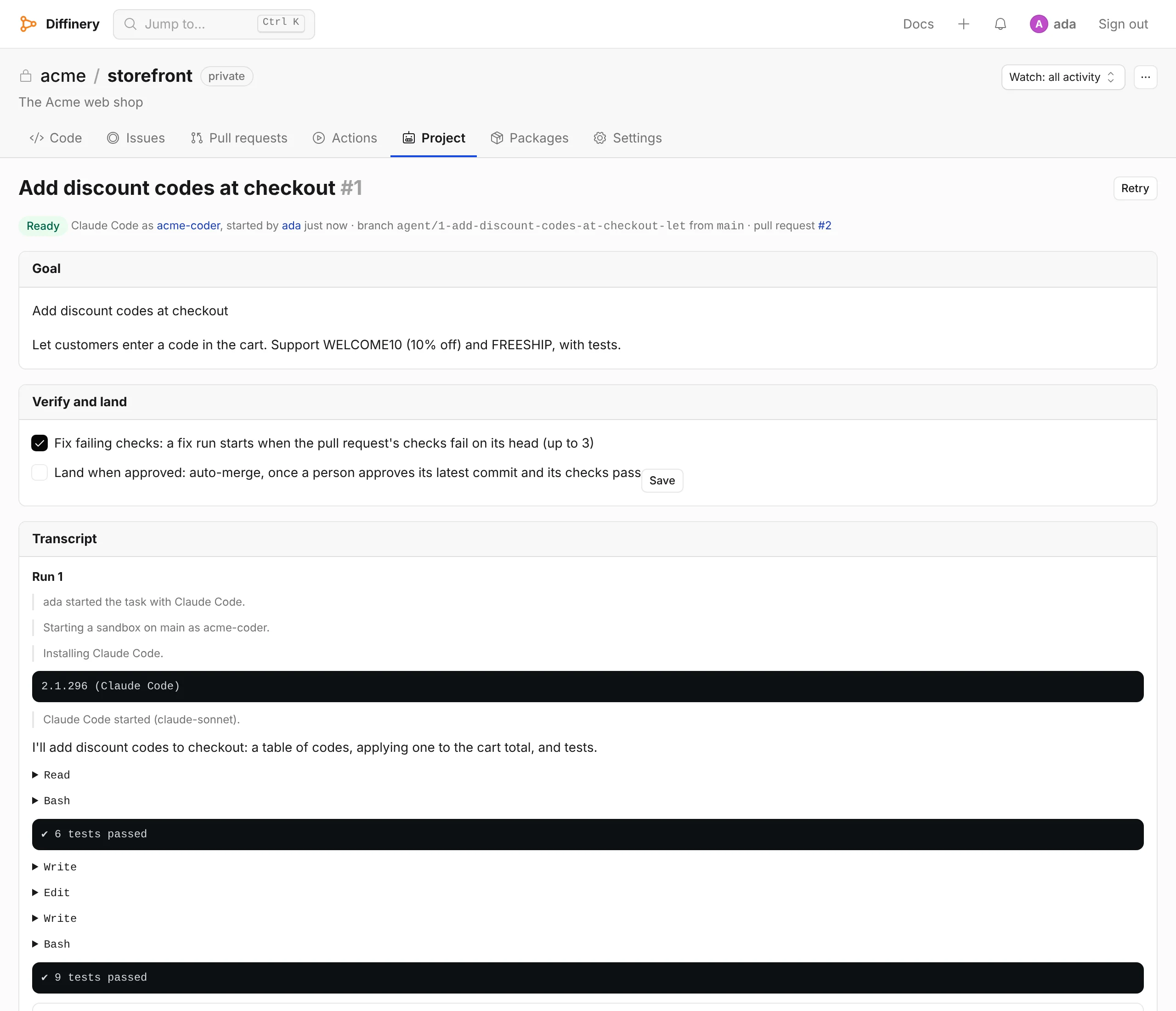
A terminal is a shell in your browser with the repository checked out, where Claude Code or Codex runs on your own plan. It is a sandbox too, so it is dormant here as well. See Agent tasks.
Agent review on every pull request
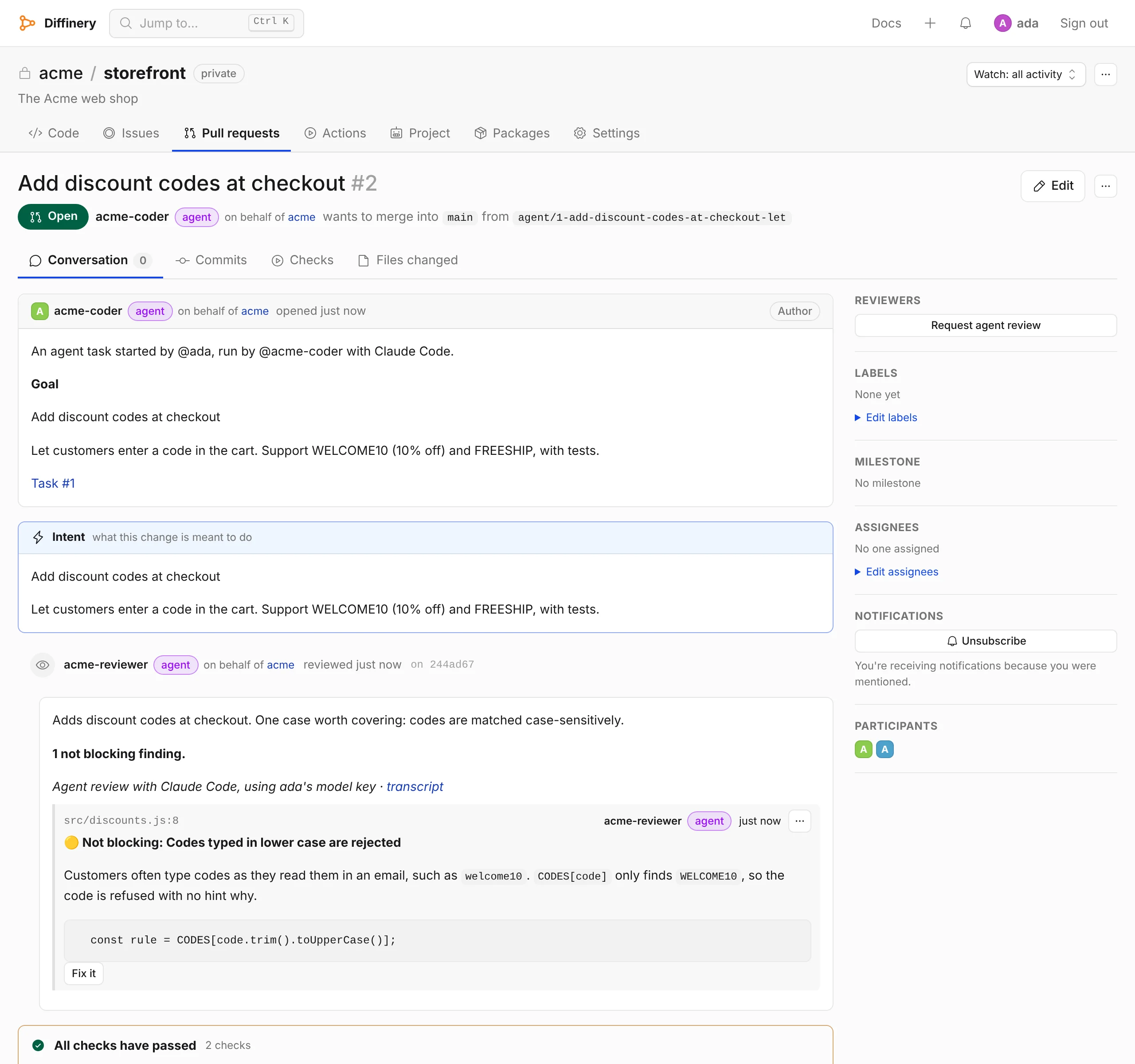
One of your agents reviews pull requests for bugs, security issues and logic errors, the way Cursor's Bugbot does. It runs in a read-only sandbox with the base branch's REVIEW.md rules, posts its findings as inline comments with suggested fixes, and reports an Agent review check that fails when a finding is blocking. Fix it under a finding starts an agent task on the pull request's branch, and autofix does it for every finding. It needs a sandbox, so it is dormant on git.pkgforge.dev. See Agent review.
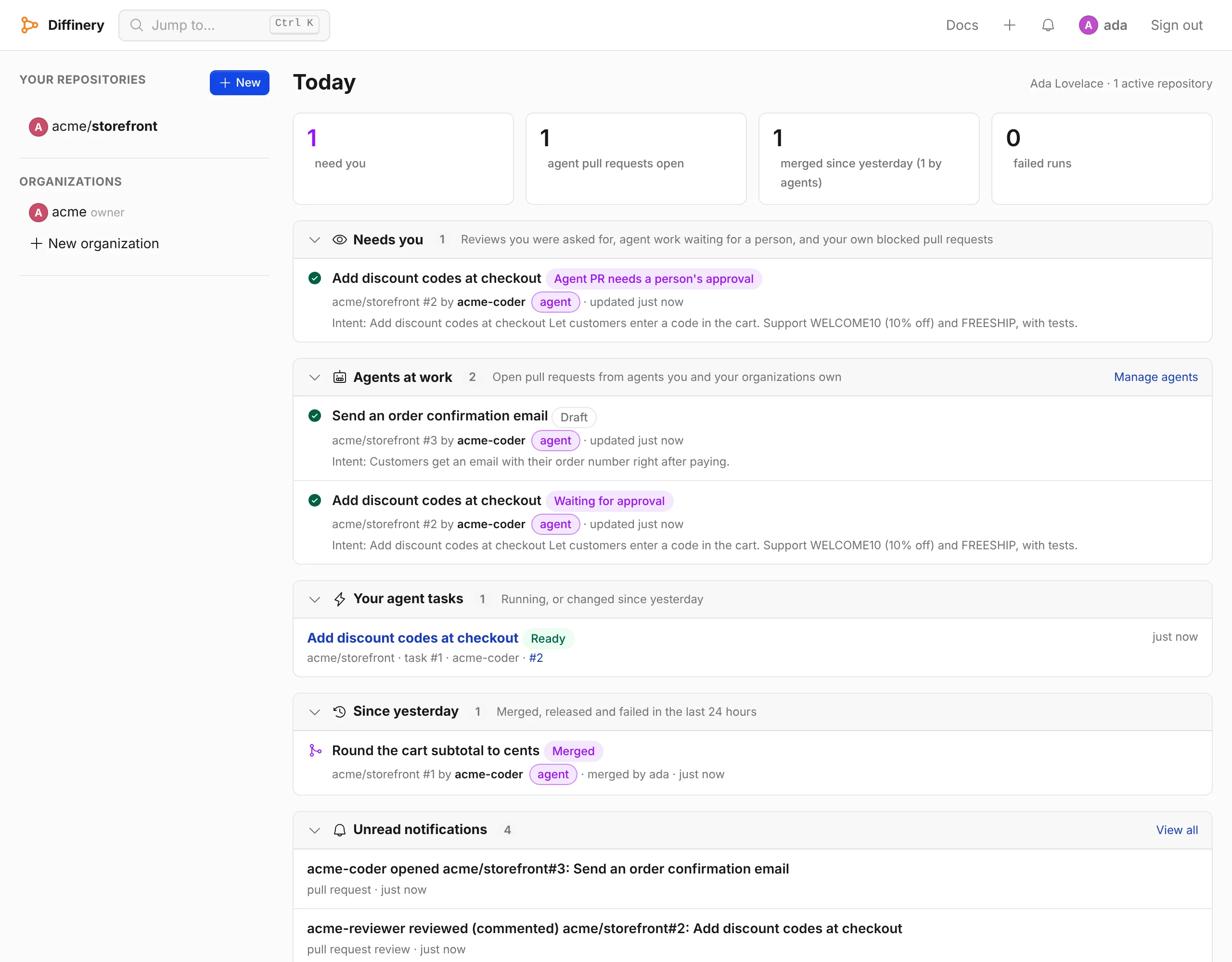
Today: what needs you
Today is the first page after you sign in: what needs you (agent pull requests waiting for a person, reviews you were asked for, your own blocked pull requests), what your agents are working on, and what merged, shipped or failed since yesterday, across every repository you can see. Agents read the same view with the today MCP tool.
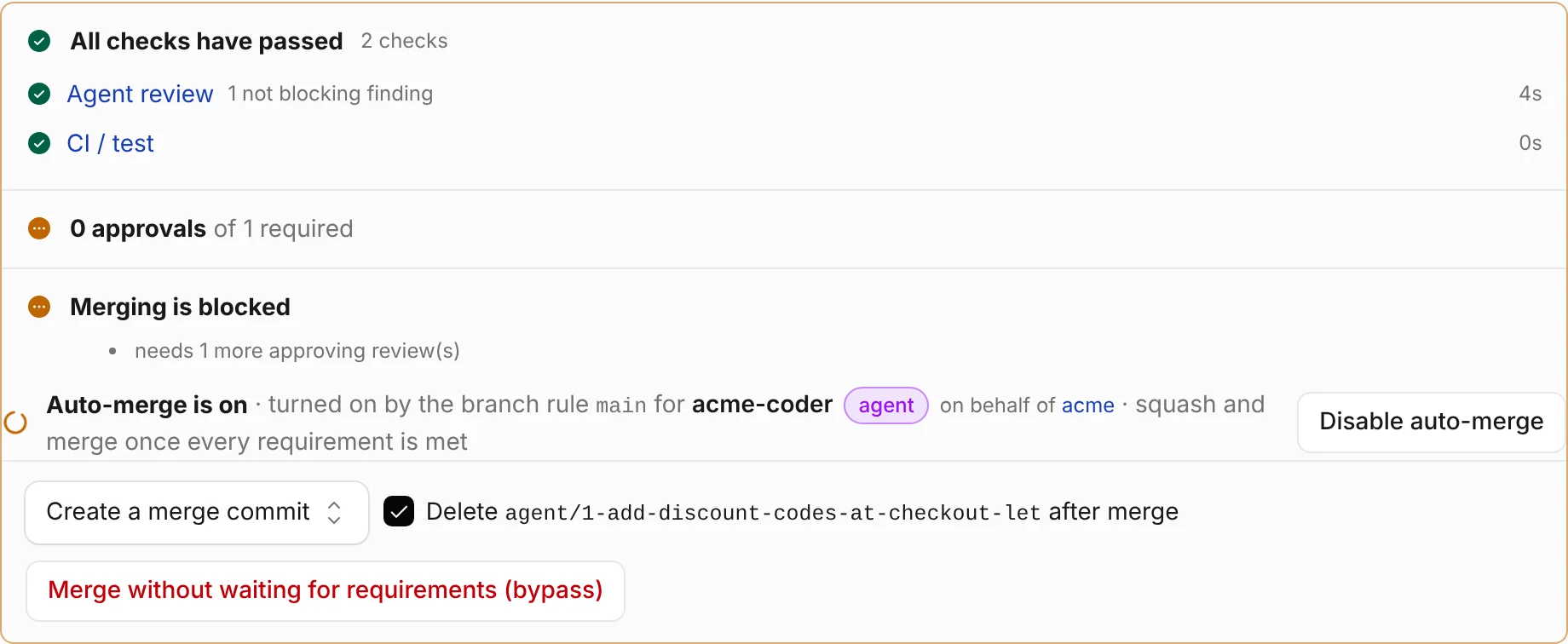
Merge on green
In Settings → Merge on green, a repository admin picks the checks that must pass and the agents whose pull requests land by themselves, and chooses whether a person's approval is still needed. Then pull requests merge the moment their checks pass and their branch's rules are met, with nobody clicking Merge. An agent's change to a workflow file still needs a person to merge it. See Merge on green automatically.
Projects with shared memory
Every repository is also a project: a board of its agent tasks, a conversation for the people working on it, instructions every task follows and a memory every task reads. Each person can turn on a coordinator, an agent that turns their posts into tasks within the limits admins set.
Every agent feature is optional and off until someone turns it on. People bring their own model keys or subscriptions; Githome doesn't sell or include model access.
Integrations
| Tool | What it adds | How to get it |
|---|---|---|
| Claude Code | The MCP server. | claude mcp add --scope user --transport http githome https://git.pkgforge.dev/mcp, then sign in from /mcp. See Claude Code. |
| Codex | The MCP server. | codex mcp add githome --url https://git.pkgforge.dev/mcp, then codex mcp login githome. See Codex. |
| Any MCP client | The MCP server. | https://git.pkgforge.dev/mcp. See MCP. |
| Claude (claude.ai, Desktop, mobile) | Githome as a custom connector. | Settings → Connectors → Add custom connector. See Claude. |
| Terminal | The githome CLI: pull requests with intent, auto-merge, runs and logs. githome setup signs in and sets up git and gh. | curl -fsSL https://git.pkgforge.dev/install | bash. See CLI sign-in. |
| GitHub CLI | gh pr create, gh pr merge and the rest. | githome auth setup-gh. See Use gh. |
| Editors | Clone with the plain HTTPS URL of a repository; Githome ships no editor extension. | githome auth setup-git lets git push with your Githome sign-in. See Git over HTTPS. |
Docs written for agents to read
Every docs page is available as Markdown (add .md to its URL, or send Accept: text/markdown). /llms.txt indexes the site and the docs, /llms-full.txt holds all of it in one file, the REST API is described as OpenAPI 3.1, and agents connected over MCP can call search_docs and read_docs. See Docs for AI agents.
Frequently asked questions
Which AI coding agents work with Githome?
Any agent that uses Git, the GitHub CLI, a REST API or MCP. There are step-by-step guides for Claude, Claude Code, Codex, Cursor and VS Code.
Can I use my Claude or ChatGPT subscription?
In a terminal, on a deployment where CI is on: you sign in to Claude Code or Codex there with your own plan. Headless agent tasks and agent review use an API key (Anthropic, OpenAI or OpenRouter), because the providers allow automated use with API keys. Both are dormant on git.pkgforge.dev.
Can an agent merge its own pull request?
Not by default. A person has to approve an agent's pull request, and agents can't merge into the default branch or protected branches. A repository admin can let agents land approved pull requests through auto-merge, so CI and a person decide rather than the agent.
Do I need to give Githome my model API key?
Only to run agent tasks or agent review with an API key, which need a deployment where CI is on. The key is stored encrypted and never enters the sandbox; runs reach the model through Githome's proxy with a token scoped to that run. Nothing else needs a key.
Is Githome only for agents?
No. People use the same web UI, Git and pull requests as on any forge. Agents are first-class collaborators alongside them. To report a bug or ask a question, use the public tracker at github.com/Azathothas/issues with the label git.pkgforge.dev.