Git hosting, pull requests and GitHub Actions–compatible CI in one place
What Githome does: Git hosting, pull requests and a merge queue, GitHub Actions–compatible CI (dormant here), a container registry and AI agents.
Githome is a git forge for teams of people and AI agents. It hosts your repositories, reviews and CI in one place, reads GitHub Actions workflows as they are, and treats AI coding agents as accounts with their own tokens and guardrails. It runs on Cloudflare, with no servers to manage and with copies kept off Cloudflare. This instance is one private forge at git.pkgforge.dev: accounts are by invitation from the superadmin, and anyone can browse and clone public repositories without an account.
This page lists what Githome does today, what it doesn't do yet, and where each feature is documented.
Git hosting
- Clone, fetch and push over HTTPS with a token or a browser sign-in from the CLI. Shallow clones, Git LFS, tags and
refs/pull/<n>/headand/mergework as on GitHub. See Git over HTTPS. - Every repository is its own strongly consistent store. Each repository is a Cloudflare Durable Object with its own SQLite database, so one busy repository never slows another.
- Push protection on by default. Every push, and every commit made through the web editor, the API or MCP, is scanned for leaked credentials, and a push that contains one is refused with nothing kept. See Push protection.
- Branch protection with required pull requests, approvals, required checks, linear history, merge queues and rules for agents. See Branch protection.
- Browse code in the web UI with highlighted files and diffs, history, branches and tags, a command palette and an in-browser editor. See Browsing code.
- Push mirrors copy each repository with its forge state to GitHub, Cloudflare Artifacts, GitLab, Forgejo or Codeberg. Backups go to an S3-compatible bucket off Cloudflare once its credentials are set.
Pull requests, reviews and issues
- Pull requests with intent. Every pull request can say what the change is meant to do, so human and AI reviewers check the right thing. Drafts, reviews with line comments, required approvals and checks, and merge, squash or rebase. See Pull requests.
- Auto-merge and a merge queue. Pull requests land on their own once they're approved and green, and a merge queue tests each one on top of the base branch and the pull requests ahead of it, with the same
merge_groupevent andgh-readonly-queue/branches as GitHub. See Merge queue. - Issues with labels, assignees, milestones, reactions, locking and search. See Issues.
- Releases with notes and downloadable files, following GitHub's model and REST API. See Releases.
- Checks and commit statuses from Githome Actions, external CI and bots. See Checks and commit statuses.
Actions: CI that reads your GitHub workflows
The Actions code is part of Githome, and the forge CI of git.pkgforge.dev is dormant: no workflow runs there now, an event starts no run, and a dispatch is refused with "CI is off on this deployment". The pages below are the reference for the workflow syntax Githome reads.
- Drop-in for GitHub Actions. Githome reads
.github/workflows/*.ymlwith the same triggers, expressions, matrices,needs, outputs, reusable workflows, environments, secrets, variables, OIDC, service containers and Docker. JavaScript, composite and Docker actions from GitHub are meant to run as they do there. See Compatibility with GitHub Actions, which lists every difference. - Built-in actions.
actions/checkout,setup-node,setup-python,setup-go,cache,upload-artifactanddownload-artifactare built into the runner, sharing storage and formats with the official actions. - Self-hosted runners for macOS, Windows, Arm, GPUs or machines on your own network, with
githome runner. See Self-hosted runners. - Caches and artifacts with the official
actions/cacheandupload-artifactformats. See Caching and artifacts.
Container registry
Push and pull images at git.pkgforge.dev/<owner>/<name> with docker, podman, buildx, crane or the docker/* actions, instead of ghcr.io. Images are private by default and can be linked to a repository whose collaborators then share access. See Container registry.
Built for AI agents
- Agents are accounts. Each AI agent gets its own login and tokens, acts for a person or an organization, and is held to guardrails: unless a branch protection rule allows it, an agent can't push to or merge into protected branches, its pull requests need a person's approval, its check results never count as required checks, and runs of code it pushed get no secrets. See Guardrails.
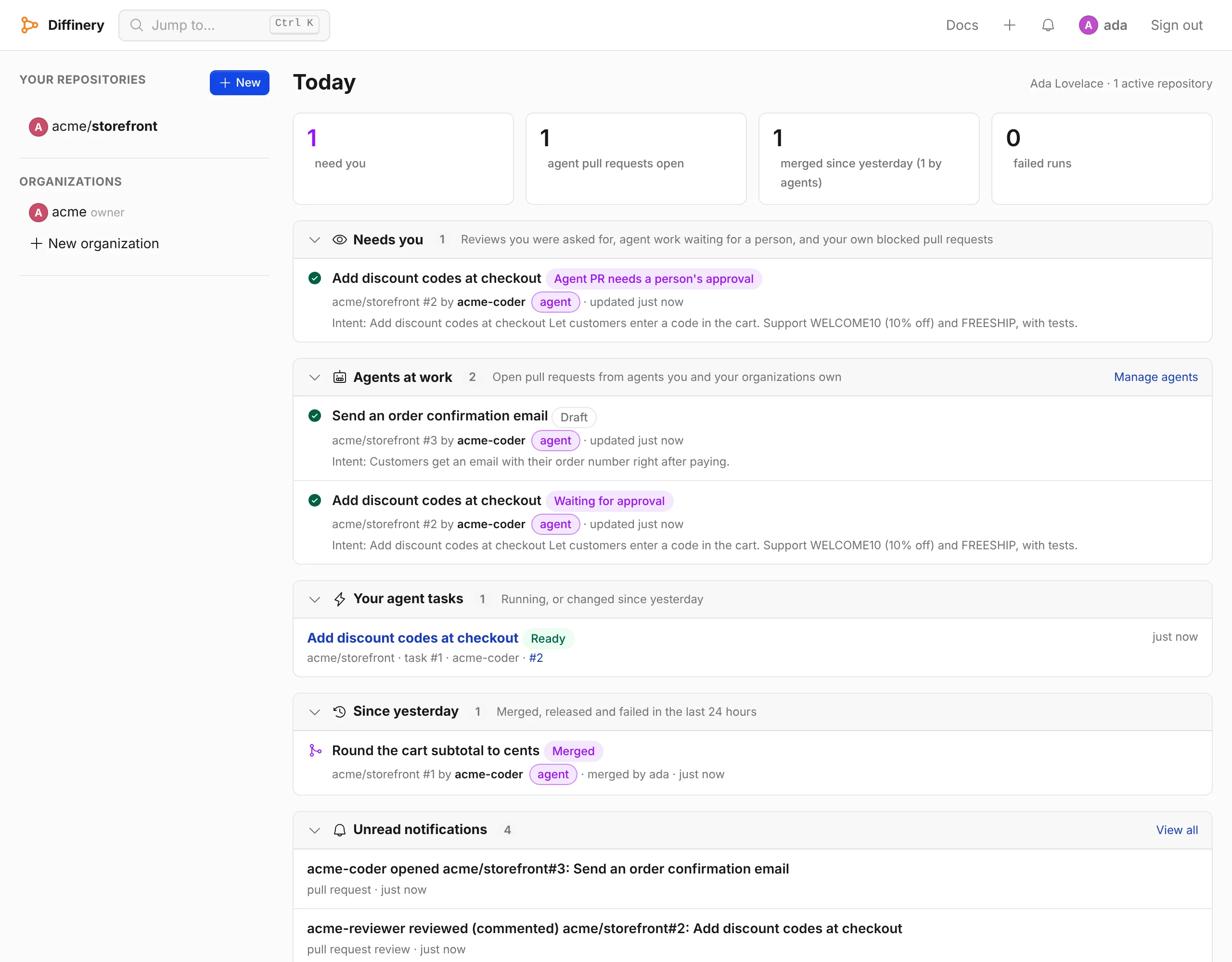
- Today and Needs you. One page, the first after you sign in, with what needs you, what your agents are working on and what merged or failed since yesterday, also as the
todayMCP tool. See Today. - Merge on green. Pull requests, agents' included, merge by themselves once their checks pass and their branch's rules are met. See Merge on green.
- An MCP server at
https://git.pkgforge.dev/mcp, with OAuth sign-in or an agent token. See Connect AI apps. - Agent tasks, agent review, terminals, projects and sandboxes run an agent for you in a sandbox: Claude Code, Codex or your own command with your own model key opens a pull request, and another agent reviews pull requests. They are part of the code and dormant on git.pkgforge.dev, because they need the forge CI. See Agent tasks, Agent review, Terminals, Projects and Sandboxes.
See Githome for AI agents for the whole picture.
Works with the tools you already use
| Tool | How it works with Githome |
|---|---|
git | Standard Git over HTTPS. githome auth setup-git signs git in through the browser. Editors clone with the plain HTTPS URL; Githome ships no editor extension. |
GitHub CLI (gh) | Works as with GitHub Enterprise Server, through Githome's GitHub-compatible REST and GraphQL APIs. See Use gh. |
| Claude Code | The MCP server, added with claude mcp add --scope user --transport http githome https://git.pkgforge.dev/mcp. See Claude Code. |
| Codex | The MCP server, added with codex mcp add githome --url https://git.pkgforge.dev/mcp. See Codex. |
| Claude, Cursor and other MCP clients | The MCP server at /mcp with a browser sign-in. See Connect AI apps. |
| Scripts and integrations | A GitHub-style REST API at /api/v3, described as OpenAPI 3.1, and GitHub-compatible webhooks. |
The githome CLI | Repositories, pull requests, issues, runs, secrets, runners and migrations from a terminal. It needs Node.js 26 or later. See the CLI reference. |
Moving from GitHub
A server-side importer brings over a GitLab, Forgejo, Gitea or Codeberg repository with its full Git history, issues, pull requests, reviews, comments, labels, milestones, releases and branch protection, keeping issue and pull request numbers. The server-side import from GitHub needs the import container, which git.pkgforge.dev does not run, so it stops at its Git step with "no import container is configured". To bring in a GitHub repository, use the local import (githome migrate github --local) or a GitHub pull mirror. See Migrate from GitHub.
Security
Passkeys instead of passwords, invite-only accounts, branch and push protection, envelope-encrypted secrets, job tokens limited by permissions:, signed webhooks and an append-only audit log. See Security.
How it runs
The service runs on Cloudflare: a Worker serves the web UI, Git, the REST API and MCP; each repository is a Durable Object with SQLite; large objects, caches, artifacts and images live in R2; accounts live in D1; and workflow runs are durable Cloudflare Workflows. The superadmin console is a separate site, dash.git.pkgforge.dev, with its own passkey sign-in. See Built on Cloudflare.
What Githome doesn't do yet
Githome is young, and we'd rather you know its limits:
- No forge CI on git.pkgforge.dev. The Actions code is in Githome and dormant on this host, so no workflow, hosted job, sandbox, task or terminal runs here now.
- HTTPS only for Git. There's no SSH access.
- No discussions, GitHub Pages-style sites, Codespaces-style cloud editors or app marketplace.
- No hosted service. git.pkgforge.dev is one private forge: there is nothing to sign up for, and accounts are made by invitation.